728x90
https://www.kickstarter.com/projects/particle-iot/tachyon-powerful-5g-single-board-computer-w-ai-accelerator
컴퓨터비전용 SBC 장난감을 펀딩했고
드디어 배송을 받았다~!
IMX 591은 오고있는중
나중에 까먹지않기 위해 설치방법을 기록하려고함.
1. 설치를 위한 1차 준비
https://developer.particle.io/tachyon/setup/install-setup
Install and Setup | Particle Developer
Let’s get your Tachyon up and running! 🚀
developer.particle.io
1. 컴퓨터에서 npm 및 particle CLI 설치 https://docs.particle.io/getting-started/developer-tools/cli/
Particle CLI 설치
# Particle CLI
bash <( curl -sL https://particle.io/install-cli )

# 업데이트 진행
particle update-cli

# 버전확인
particle --version
2. 장비 프로그램 모드 전환
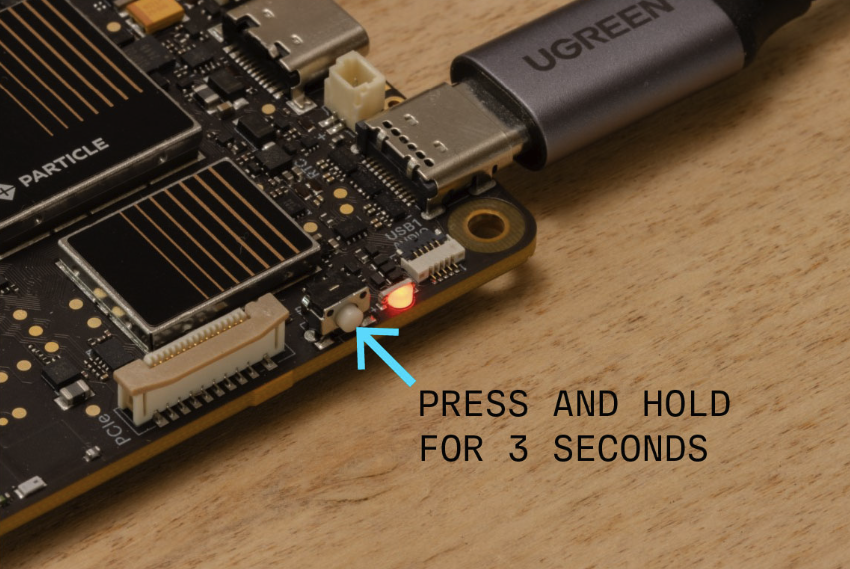
# 전원버튼 3초이상 꾹 누르면 노란색으로 LED 바뀜
# usb 확인
particle usb configure

# Tachyon 설치
particle tachyon setup

# 단계 쭈욱 이어가면됨!
# 설치가 다되면 이렇게 뜸

All done! Your Tachyon device is ready to boot to the desktop and will automatically connect to Wi-Fi.

To continue:
  - Disconnect the USB-C cable
  - Connect a USB-C Hub with an HDMI monitor, keyboard, and mouse.
  - Power off the device by holding the power button for 3 seconds and releasing.
  - Power on the device by pressing the power button.

When the device boots it will:
  - Activate the built-in 5G modem.
  - Connect to the Particle Cloud.
  - Run all system services, including the desktop if an HDMI monitor is connected.

Learn more about Tachyon at our developer site: https://developer.particle.io/tachyon

View your device on the Particle Console at: https://console.particle.io/tachyon-번호/devices/장비번호

# 다시 부팅하면
전원 led가 보라색으로 뜰거임
혹시나 문제가 생겼다면 초기화하고 다시진행!
https://developer.particle.io/tachyon/troubleshooting-and-tricks/restore
# 이제 591 카메라 붙이러가야지~
728x90
'Server > [SBC]' 카테고리의 다른 글
| [Tachyon] Powerful 5G single-board computer w/ AI accelerator (0) | 2025.06.17 |
|---|